Smart Receipts: Expenses & Tax
Publisher Description
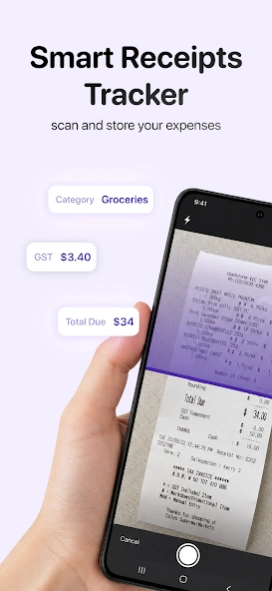


AI Receipt Scanner: expense, mileage, tax, business, finance & bills organizer
Transform your phone into a powerful receipt scanner, expense tracker, and mileage tracker — all in one app.
Smart Receipts helps individuals, freelancers, and business owners capture every expense, maximize every IRS deduction, and turn tax season from a headache into a few taps.
SMART RECEIPTS — YOUR ALL-IN-ONE EXPENSE SOLUTION
Whether you're managing personal finances or running a small business, Smart Receipts delivers customizable PDF, CSV, and ZIP reports built for real-world accounting. Organize expenses into "folders," categorize spending, and generate professional reports that simplify tax filings, reimbursements, and bookkeeping.
KEY FEATURES
• Powerful receipt scanner with AI-powered OCR — capture every detail in seconds
• Snap photos with your camera or import existing images
• Upload and process PDF receipts effortlessly
• Import your existing CSV files or bank statements in seconds
• Connect your bank account (USA & Canada only) to automatically pull in expenses and transactions
• Track price, tax, currency, and payment method for every purchase
• Tag entries with names, categories, comments, and custom metadata
• Built-in mileage tracker for reimbursement and IRS deduction claims
• Automatic exchange rate calculations for international travel and business trips
• Smart predictions based on past entries — faster reporting every time
• Fully customizable PDF, CSV, and ZIP reports
SAVE HOURS EVERY WEEK
Stop typing expenses into spreadsheets. Smart Receipts eliminates manual data entry by combining a fast receipt scanner, CSV import, and direct bank sync (USA/Canada). Whether you're tracking a single business trip or a year of deductions, your records stay organized and tax-ready.
BUILT FOR ACCOUNTING & BOOKKEEPING
Accountants, bookkeepers, and small business owners trust Smart Receipts to keep clients audit-ready. Export clean, IRS-friendly reports in seconds and spend less time chasing paperwork.
YOUR DATA, SECURED
Smart Receipts protects your sensitive financial information with secure automatic backups to our private cloud and AI-powered OCR for accurate scanning. Your records stay safe, organized, and accessible whenever you need them.
JOIN OVER 1,000,000 USERS
More than a million people trust Smart Receipts as their go-to expense tracker and mileage tracker. Built by a seasoned consultant, the app is designed for efficiency, flexibility, and the realities of modern financial management.
Download Smart Receipts today and take control of your expenses, deductions, and tax returns.
About Smart Receipts: Expenses & Tax
The company that develops Smart Receipts: Expenses & Tax is REACTIVE APPS CORP.. The latest version released by its developer is 1.0 . This app was rated by 1 users of our site and has an average rating of 3.0.
To install Smart Receipts: Expenses & Tax on your Android device, just click the green Continue To App button above to start the installation process. The app is listed on our website since 2026-10-06 and was downloaded 19 times. We have already checked if the download link is safe, however for your own protection we recommend that you scan the downloaded app with your antivirus. Your antivirus may detect the Smart Receipts: Expenses & Tax as malware as malware if the download link to wb.receipts is broken.
How to install Smart Receipts: Expenses & Tax on your Android device:
- Click on the Continue To App button on our website. This will redirect you to Google Play.
- Once the Smart Receipts: Expenses & Tax is shown in the Google Play listing of your Android device, you can start its download and installation. Tap on the Install button located below the search bar and to the right of the app icon.
- A pop-up window with the permissions required by Smart Receipts: Expenses & Tax will be shown. Click on Accept to continue the process.
- Smart Receipts: Expenses & Tax will be downloaded onto your device, displaying a progress. Once the download completes, the installation will start and you'll get a notification after the installation is finished.
Program Details
System requirements
Download information
Pricing
Version History
version
posted on 2026-10-06
• Added customizable email subject templates for receipts and reports
• Improved recognition when importing multiple receipts at once
• Better on-device scanning for rotated and upside-down receipts
• Improved receipt recognition in multiple languages
• Receipt lists now follow your selected date format
• Improved validation of currency exchange rates
• Fixed an issue where attached files could be removed unexpectedly
version
posted on 2026-09-03
• Improved UI and app navigation
• Improved navigation bar
• Stability improvements
version
posted on 2026-08-25
• Improved UI and app navigation
• PDF report stability improvements
version
posted on 2026-08-13
• Cloud backup and sync stability improvements.
version
posted on 2026-07-29
• Smart Receipts is now completely ad-free for a cleaner, faster experience
• NEW! Insights: View your spending for This Year, Last Year, or All Time
• Improved Cloud Sync reliability with better offline and network handling
• Fixed an issue with negative receipt amounts
• Improved date and time accuracy with better timezone support
• Polished the interface with improved layouts and spacing
• Bug fixes and performance improvements
version
posted on 2026-07-21
• Improved the "Receipts for Review" interface
• Bug fixes and performance improvements
version
posted on 2026-06-29
• Automatic receipt detection in your Photos gallery
• Refreshed parts of the app with a cleaner, more modern interface
• Faster startup and improved overall app stability
• Improved widget compatibility and reliability
• Bug fixes and performance improvements
version
posted on 2026-06-02
• Added new receipt categories for better organization
• Improved bank connection experience with better Plaid syncing and login handling
• Fixed issues with deep links and universal links opening correctly after launch
• Fixed PDF export ordering so attached files now match your receipt list
• Improved sync reliability and recovery of missing files
• Various bug fixes and performance improvements
version
posted on 2026-04-30
• NEW! Import expenses from CSV files, screenshots, or bank statements
• Connect your bank account to automatically import transactions (US & Canada only)
version
posted on 2026-02-20
• You can now pull to refresh in Settings for quicker updates
• Fixed an issue with incorrect (-1) exchange rates
• Resolved the “Receipts to Review” popup for selected reports
